Stores on TaxWisp Basic Plan
This is the store guide designed for Shopify stores on TaxWisp Basic Plan. Please refer to the Installation Guide if you have not configured and enabled TaxWisp already on your store. This guide will walk you through accessing and using the TaxWisp app from your Shopify admin portal, setting up the app, and handling tax exemption management for your store. App activities include receiving tax exemption requests from customers, validating these requests, approving or rejecting them, revoking exemptions, and tracking the status of tax exemption requests. Now it's time to use the app to manage your store's tax exemptions seamlessly.
Getting Started
You have installed the TaxWisp already following the on-screen instructions. After installation, go to the TaxWisp app from your Shopify admin portal and pin the app to your navigation to make it easily accessible.
Accessing the TaxWisp Dashboard
After completing the installation and initial setup, you can manage all your sales tax exemption activities from the TaxWisp Dashboard.
To access the dashboard:
- Log in to your Shopify Admin.
- From the left navigation menu, click Apps.
- Select TaxWisp.
- Pin TaxWisp to your Shopify Admin navigation for quicker access in the future.
Once opened, you'll be taken to the TaxWisp Dashboard, where you can receive and manage customer tax exemption requests, review exemption certificates, configure your store settings, and monitor exemption activity.
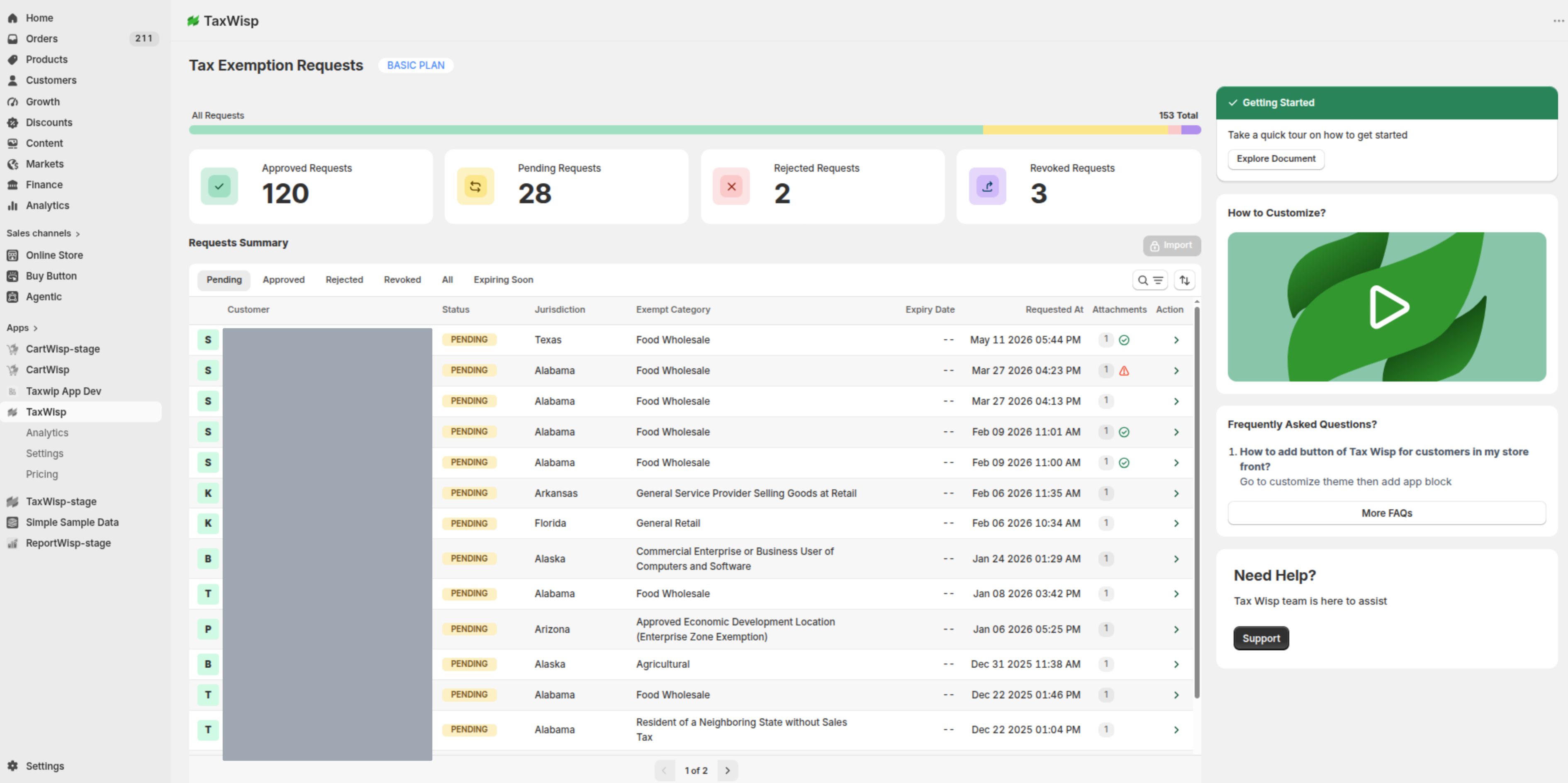
The TaxWisp Dashboard provides quick access to the following sections:
- Exemption Requests – View, review, approve, or reject customer tax exemption requests.
- Analytics & Insights – Access your Tax Exemption Audit History. Additional analytics and reports are available on higher plans.
- Settings – Configure communication emails, customer tags, storefront content, and other TaxWisp settings.
- Pricing – View your current subscription plan and explore additional features available on higher plans.
- Storefront Extension Shortcuts – Quickly open the Shopify Theme Editor to manage your TaxWisp storefront extensions.
The dashboard also provides summary cards that give you an overview of your tax exemption activity, helping you quickly identify requests that require your attention.
Depending on your store's activity, you may see information such as:
- Pending exemption requests
- Approved exemption requests
- Rejected exemption requests
- Expired exemptions
- Total tax-exempt customers
We recommend checking your TaxWisp Dashboard regularly to review new exemption requests, monitor exemption activity, and ensure customer requests are processed promptly.
Managing Tax Exemption Requests
TaxWisp provides a centralized dashboard where you can manage every stage of the sales tax exemption lifecycle. From reviewing incoming requests to approving eligible customers and monitoring exemption status, everything is organized in one place to simplify exemption management and maintain compliance.
Tax exemptions can only be applied for jurisdictions where your business has a valid tax-exempt presence or meets the applicable exemption requirements.
Receiving Tax Exemption Requests
Customers can submit tax exemption requests through the following experiences, depending on how your store is configured:
- Online Storefront – Customers submit their exemption request directly from your storefront.
- TaxWisp Customer Portal (Paid Plans) – Customers are redirected to the TaxWisp Customer Portal to complete and track their exemption requests.
- Tax Exemption Preclaim (Premium Plan) – Customers can place an order first and complete exemption verification before fulfillment.
Whenever a customer submits an exemption request:
- The request appears immediately in your TaxWisp Dashboard.
- Configured communication email addresses receive an automated notification.
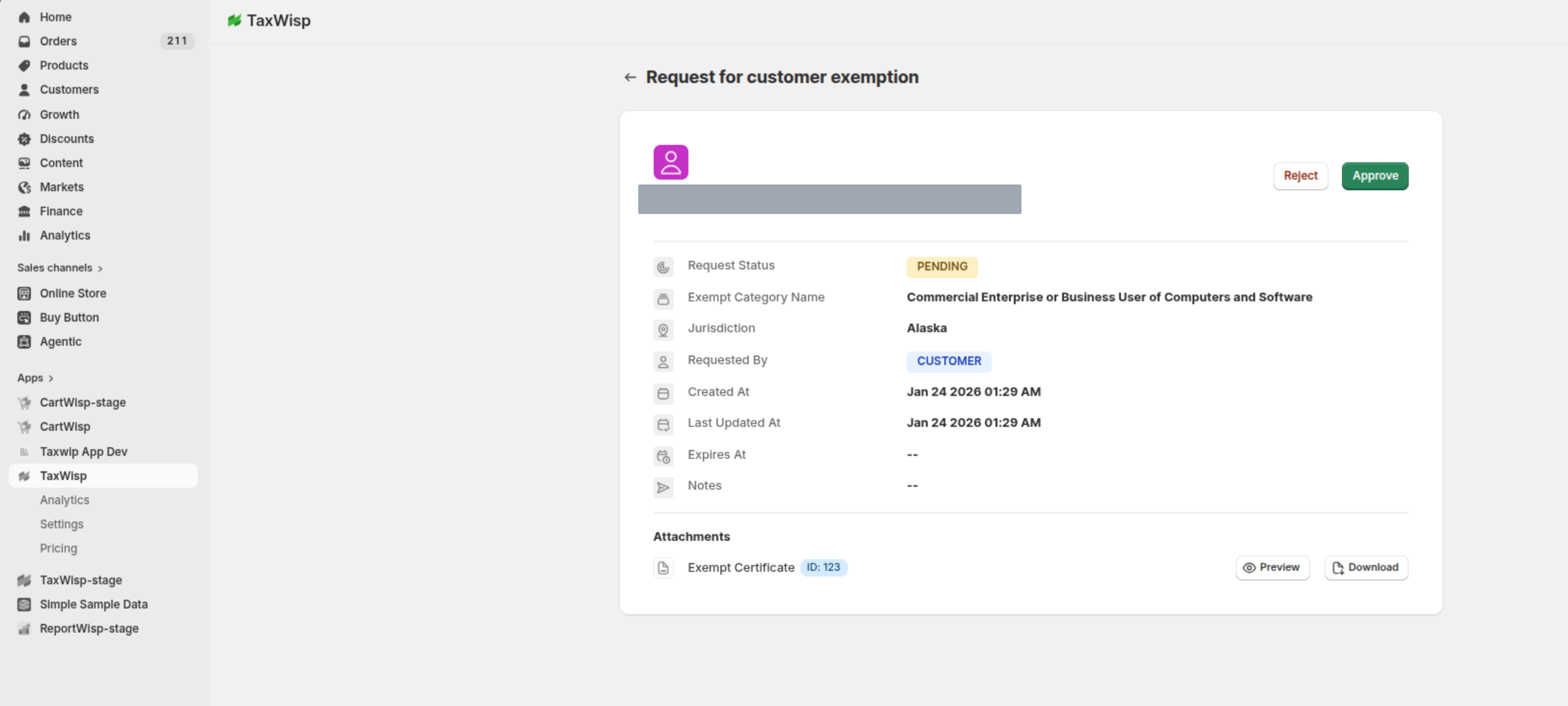
- The request includes the customer's information, exemption details, uploaded certificate, supporting documents, and current request status.
From the dashboard, you can review each request and decide whether to approve or reject it.
Auto-Approval Setting for Tax Exemption Requests
TaxWisp allows you to choose how exemption requests are reviewed and approved.
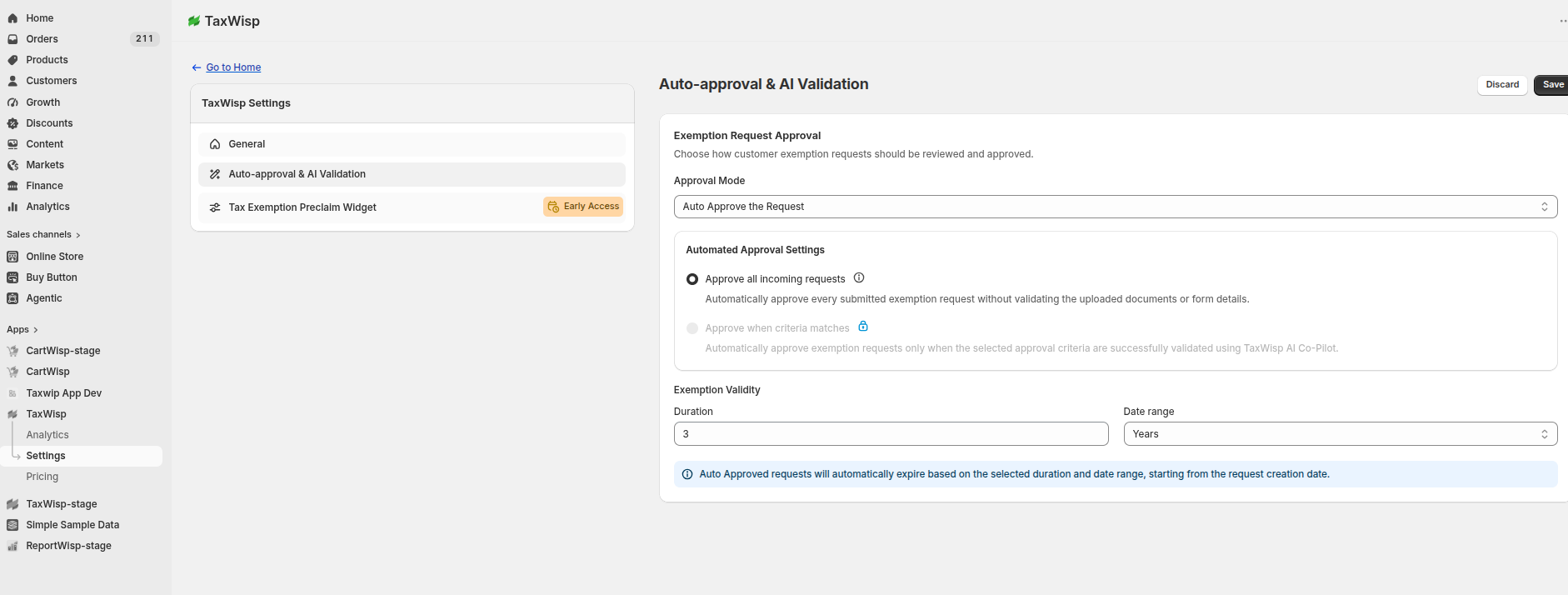
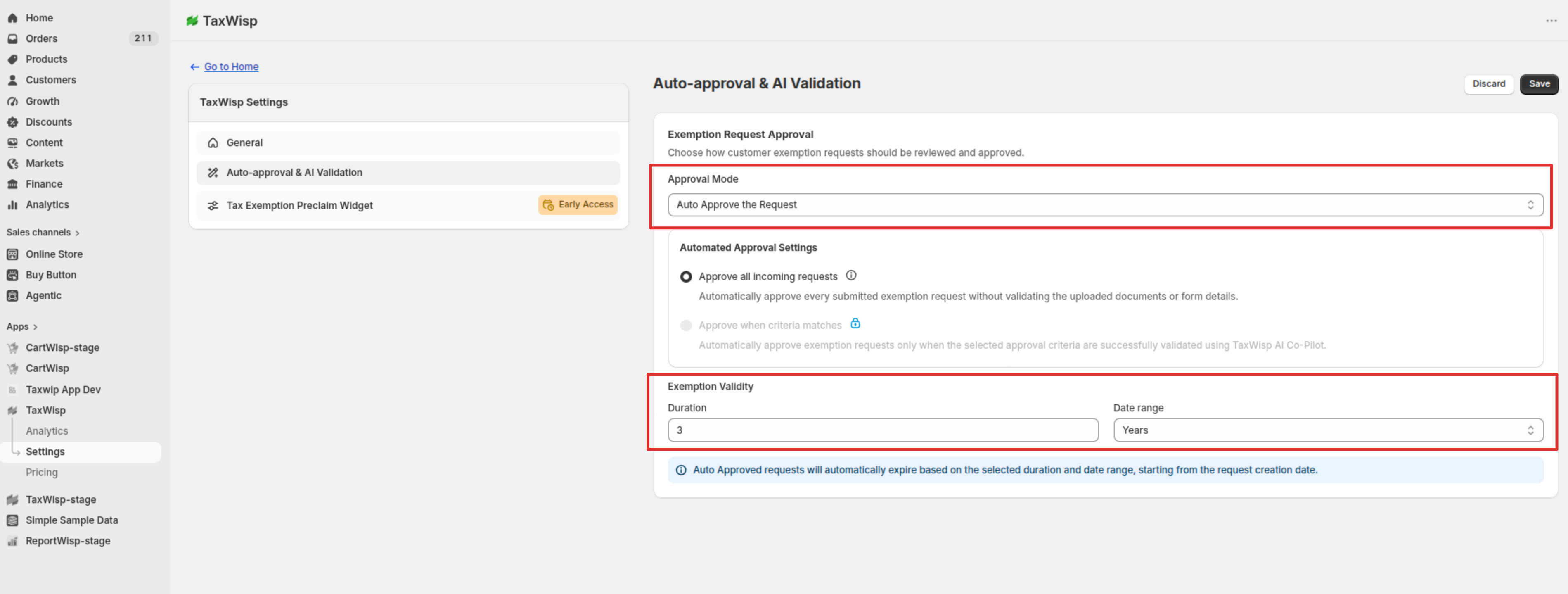
Auto-Approve All Exemption Requests
When Auto Approval is enabled, every incoming exemption request is automatically approved immediately after submission without requiring manual review.
Approved customers:
- Become tax-exempt immediately.
- Receive tax-exempt checkout on eligible purchases.
- Are automatically assigned your configured customer tags.
- Have their exemption activity recorded in the audit history.
You can also specify an exemption validity period (days, weeks, months, or years). Once the validity period expires, customers must submit a new exemption request to continue receiving tax-exempt checkout.
Manual Approval
When Auto Approval is disabled, every exemption request requires manual review before it is approved.
Before approving a request, we recommend reviewing:
- Customer information
- Selected tax jurisdiction
- Exemption category
- Uploaded exemption certificate
- Supporting documents (if provided)
After reviewing the request, you can either Approve or Reject the exemption based on the submitted information.
Criteria-Based Auto Approval, which uses AI-powered document validation to automatically approve requests based on configurable approval criteria, is available on the TaxWisp Premium Plan.
Setting Emails for Notifications
TaxWisp sends email notifications to stores for key tax exemption events—such as new exemption requests, approvals, expirations, and more. By default, these notifications are sent to the store admin email configured in your Shopify account.
However, you can customize your email preferences within the TaxWisp app:
- Add Additional Email Addresses to receive tax exemption-related updates.
- Change the Default Email Address if you'd prefer notifications to go elsewhere.
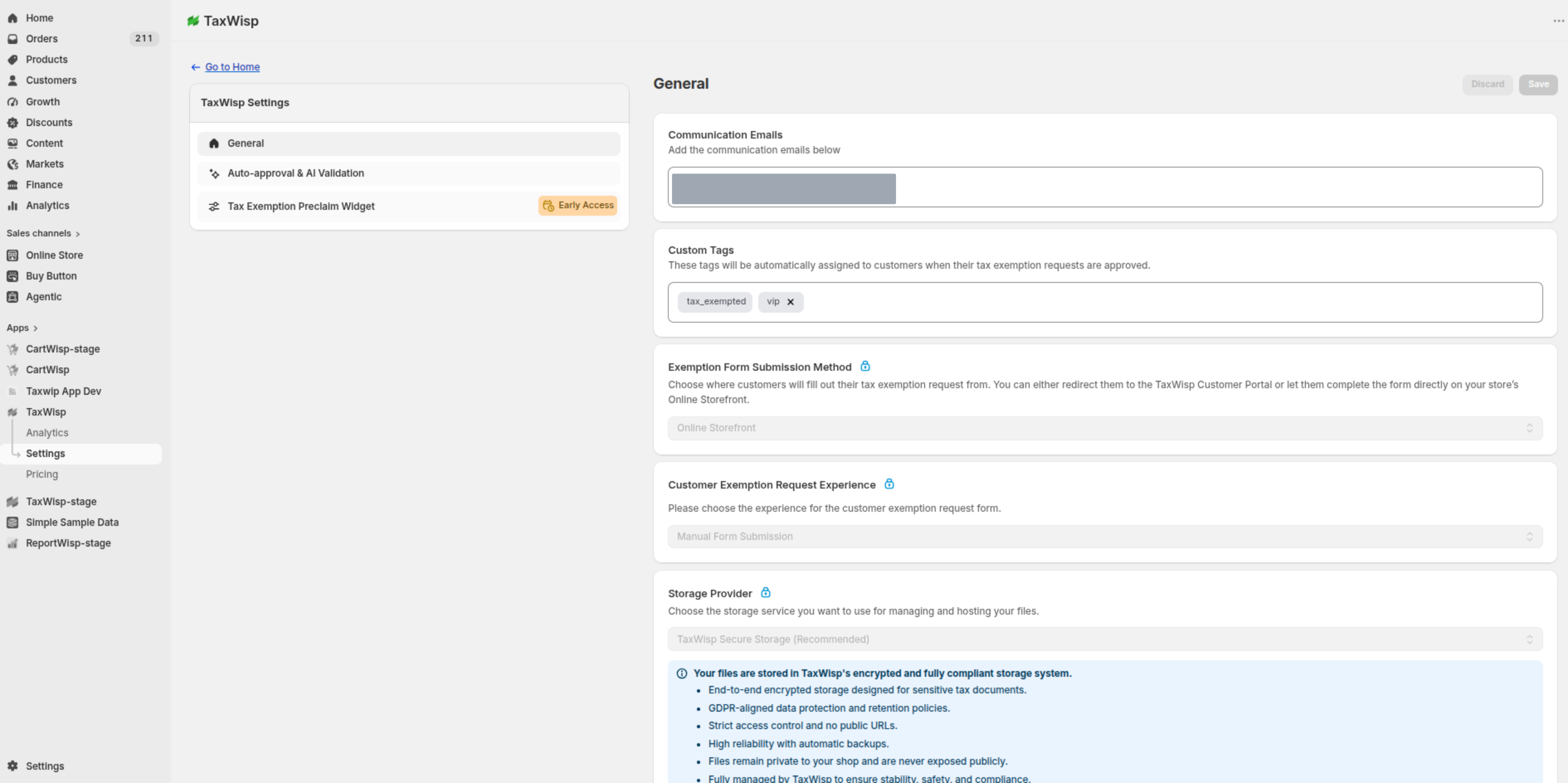
This ensures that the right people on your team stay informed and never miss an important update in the exemption process.
Modifying Expiry Date of Customer Tax Exemptions
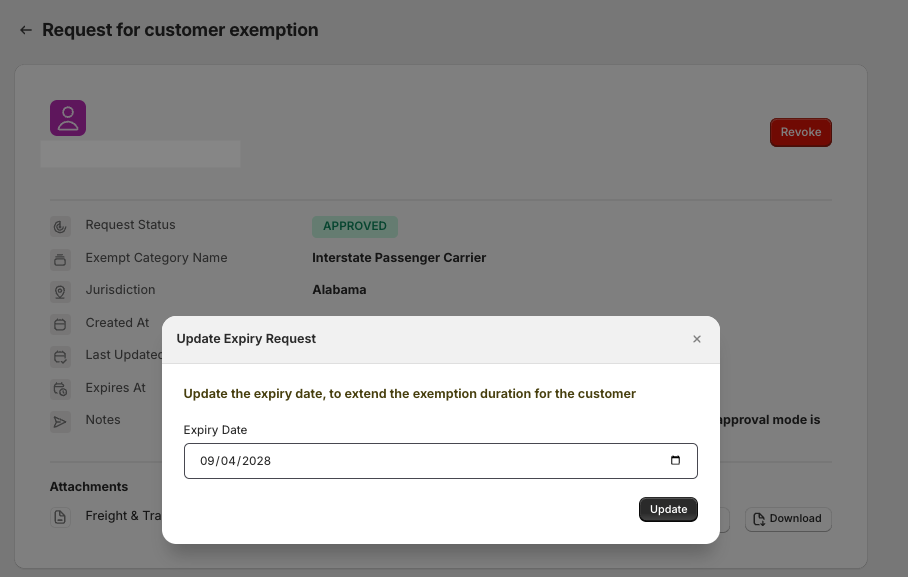
To give store owners better control over exemption validity, TaxWisp allows you to update the expiry date for already approved customer exemptions—especially useful when exemptions are about to expire.
To modify the expiry date, simply go to the Expiring Soon section in your TaxWisp dashboard and locate the customer exemption you'd like to update and navigate to the detailed page.
Click on the edit icon next to the current expiry date, and you’ll be able to select a new expiry date from the calendar. Once updated, the new expiry date will take effect immediately.
Analytics & Insights
The Analytics & Insights page provides a centralized view of your store's sales tax exemption activity. Depending on your TaxWisp plan, you'll have access to different levels of reporting and operational insights.
Analytics (Standard & Premium Plans)
The Analytics tab provides visual insights into your store's tax exemption activity, helping you monitor exemption trends and make informed business decisions.
With Analytics, you can:
- Monitor tax exemption requests and approval trends.
- Analyze approved and rejected exemption requests.
- Track tax-exempt customers and exemption activity over time.
- Gain insights into your store's exemption performance.
Reports (Standard & Premium Plans)
The Reports tab presents tax exemption data in a structured table format, making it easier to review exemption activity and generate business reports.
Premium Plan merchants can also export reports for auditing, accounting, compliance, and internal analysis.
Tax Exemption Audit History (Available on All Plans)
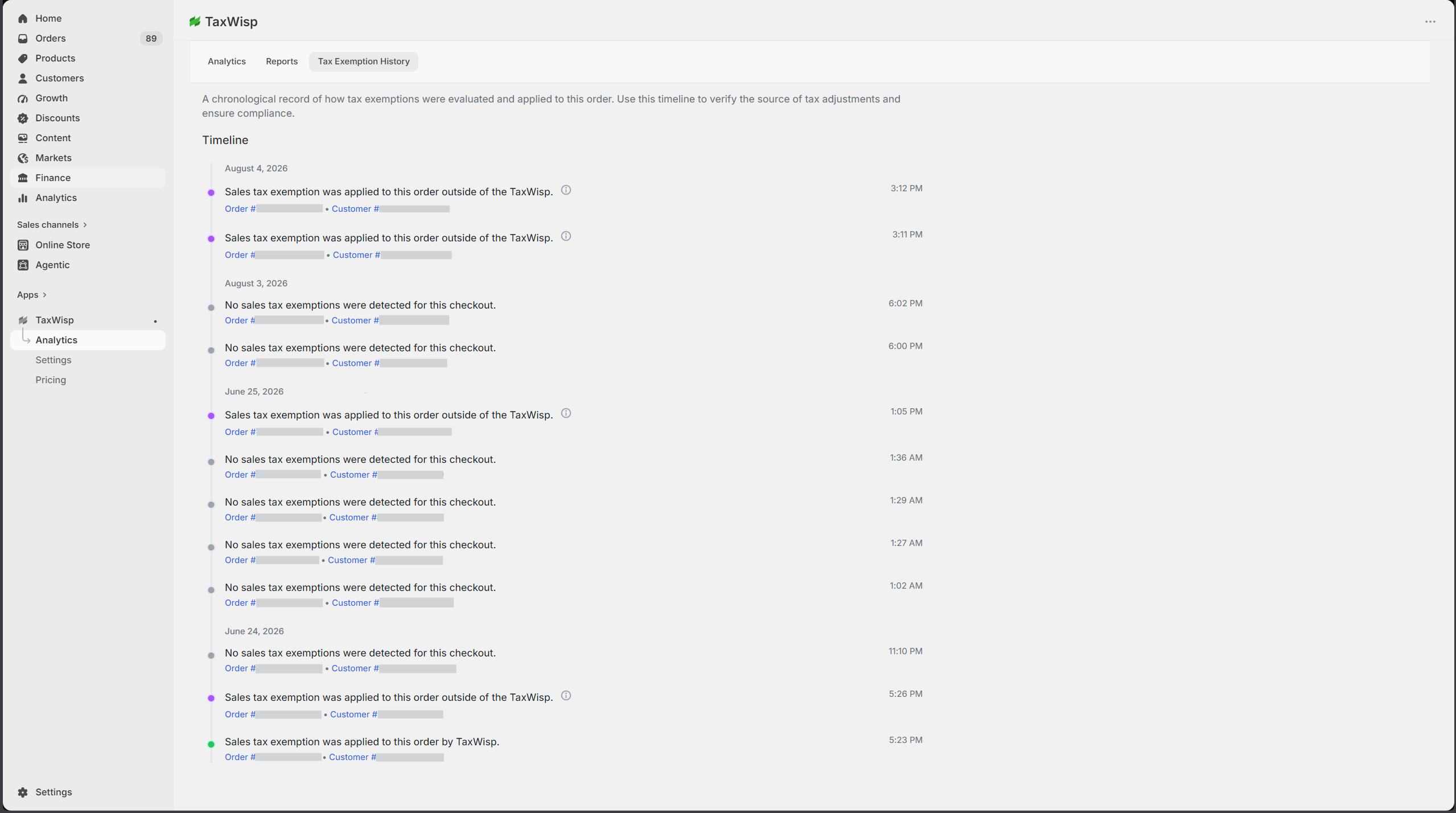
The Tax Exemption Audit History tab maintains a chronological record of important events throughout the tax exemption lifecycle. It provides complete visibility into how tax exemptions were requested, reviewed, approved, applied, or modified over time.
Each timeline entry includes the event description, timestamp, and related customer or order information, helping you understand exactly how a tax exemption was processed.
Typical audit events include:
- Tax exemption request submitted
- Pending verification created through Tax Exemption Preclaim
- Customer notified to complete exemption verification
- Exemption request approved or rejected
- Tax exemption applied to an order
- Exemption revoked or expired
- Other important exemption-related activities
This audit history provides a transparent record of every significant exemption event, making it easier to troubleshoot issues, answer customer inquiries, and maintain audit-ready compliance.
Subscription Plans
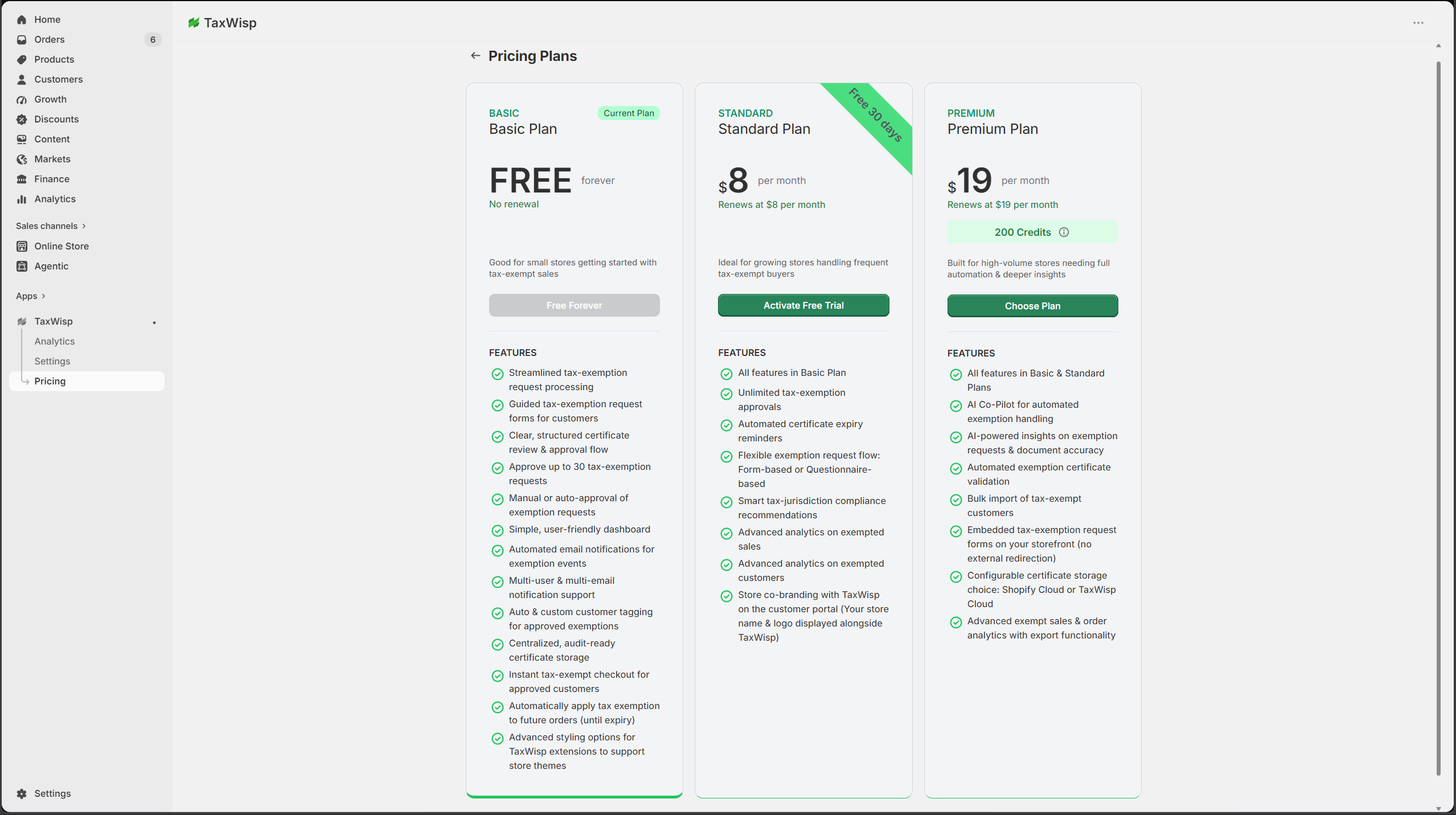
TaxWisp offers flexible subscription plans designed to support businesses at every stage, from stores just getting started with sales tax exemption management to high-volume merchants that require advanced automation, analytics, and compliance features.
Each plan builds upon the previous one, allowing you to upgrade as your business grows and your tax exemption requirements become more sophisticated.
Basic Plan
The Basic Plan is ideal for small businesses or stores that receive a limited number of tax exemption requests each month. It provides the essential tools required to collect, review, and manage sales tax exemption requests without additional cost.
The Basic Plan includes:
- Guided tax exemption request workflow
- Manual approval of exemption requests
- Auto Approval (Approve All Requests)
- Up to 30 approved tax exemption requests
- Automatic customer tagging
- Tax-exempt checkout for approved customers
- Tax Exemption Audit History
- Automated email notifications
- Customizable storefront extension content
Once your store reaches the limit of 30 approved tax exemption requests, additional requests cannot be approved until you upgrade to a paid plan.
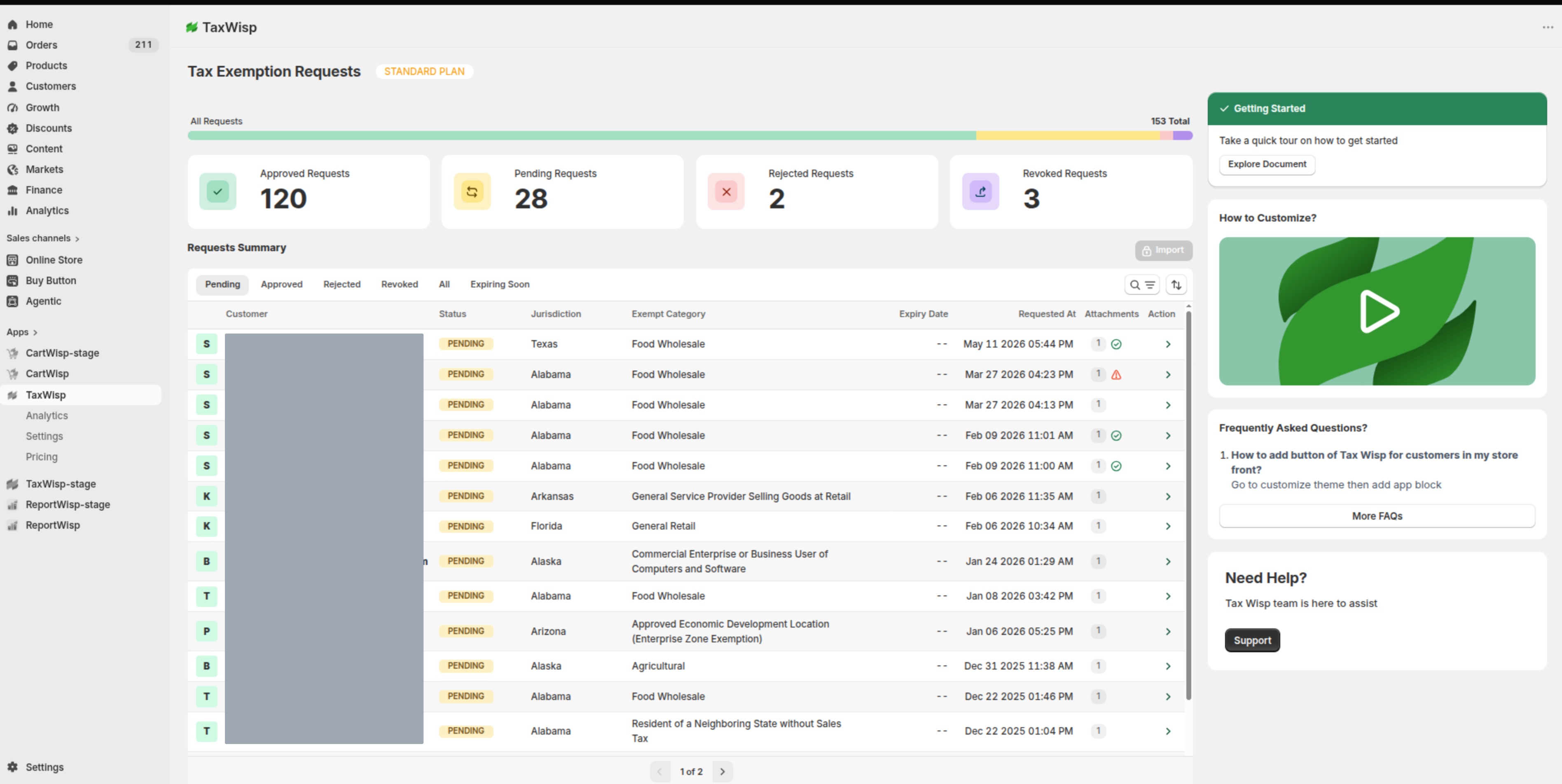
Standard Plan
The Standard Plan is designed for growing businesses that manage tax exemptions regularly and require greater visibility into exemption activity.
In addition to all Basic Plan features, the Standard Plan includes:
- Unlimited tax exemption approvals
- Analytics Dashboard
- Reports
- Customer Exemption Request Experience
- Manual Form Submission
- Chat-Based Recommendation
- Co-branding for the TaxWisp Customer Portal
- Automated certificate expiry reminders
- Smart jurisdiction compliance recommendations
The Standard Plan is ideal for merchants looking to improve operational efficiency while gaining valuable insights into their tax-exempt customers and exemption activity.
Premium Plan
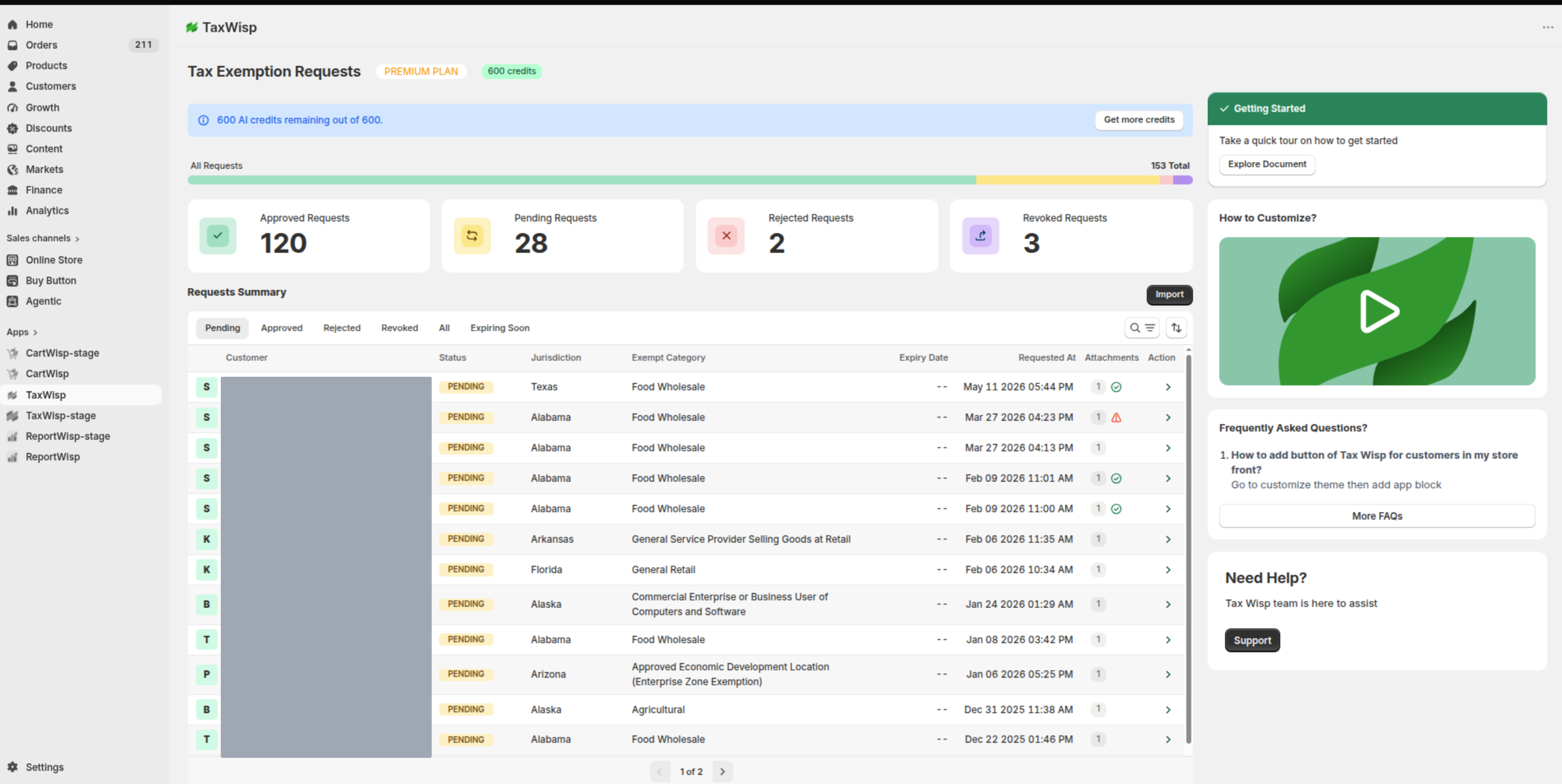
The Premium Plan is built for high-volume merchants and enterprise businesses that require advanced automation, AI-powered validation, and flexible exemption workflows.
In addition to all Standard Plan features, the Premium Plan includes:
- AI Co-Pilot for document validation
- Criteria-Based Auto Approval
- Bulk Import of tax-exempt customers
- Tax Exemption Preclaim
- Flexible Exemption Form Submission
- Online Storefront
- TaxWisp Customer Portal
- Configurable Storage Provider
- TaxWisp Secure Storage
- Shopify CDN Storage
- Export Reports
- AI validation credits with optional credit top-ups
The Premium Plan helps merchants automate exemption processing, reduce manual effort, improve compliance, and deliver a seamless purchasing experience for tax-exempt customers.
If your store processes a high volume of exemption requests, serves B2B or wholesale customers, or wants to automate exemption verification using AI, the Premium Plan provides the most comprehensive sales tax exemption management experience.
Choosing the Right Plan
Choose the plan that best matches your business requirements:
- Basic – Best for stores beginning to manage tax-exempt customers with lower request volumes.
- Standard – Ideal for growing businesses that need unlimited approvals, analytics, and a more personalized customer experience.
- Premium – Designed for high-volume and enterprise merchants seeking AI-powered automation, advanced compliance workflows, and the most flexible customer experience.
As your business grows, you can upgrade your TaxWisp subscription at any time to unlock additional capabilities without disrupting your existing tax exemption data or customer records.
By following this configuration guide, you can tailor the TaxWisp Shopify App to optimize tax exemption processes and deliver a seamless experience for both, your store and your customers. If you encounter any challenges or need assistance during the configuration process, don't hesitate to reach out to our Support Team for help. We're here to ensure your success with our app.